Organizations equipping meeting rooms with Microsoft Teams Rooms are increasingly searching for a Teams Panel alternative. Certified Teams Panels from Cisco, Neat, Poly, Logitech, Yealink, and Crestron all share the same design: a color touchscreen, a power cable, and a Microsoft Teams Rooms Pro subscription. For IT managers and facility managers who want a simpler, more sustainable room booking display, ROOMZ offers a wireless alternative built on E-ink© technology, with no cabling and no additional MTR subscription.
This guide explains what a Teams Panel actually is, why so many companies are now looking for a cabled Teams panel solutions alternative, and how a wireless e-ink display compares on cost, security, installation, and sustainability. Some companies specifically search for a Teams booking display alternative or a cabled room booking display alternative, while others are looking for a wired meeting room display alternative for the entire office. The underlying requirement is the same: the functionality of a Teams Panel without the cable, the PoE switch, and the mandatory subscription.
What is a Microsoft Teams panel, and why look for an alternative?
A Teams Panel is a Microsoft-certified, Android-based device mounted outside a meeting room to display room availability, upcoming meetings and allow instant booking.
According to
Microsoft’s certified hardware list, certified manufacturers include Cisco (Room Navigator), Neat (Pad Panel), Poly (TC10), Logitech (Tap Scheduler, Dock Flex), Yealink (RoomPanel and RoomPanel E2), Crestron (TSS series), AudioCodes (RX-Panel), Jabra (Scheduler), MaxHub (Panel SP10), and Q-SYS (Room Scheduling Panel).
Every one of these devices shares three characteristics. First, they run on Android and need a permanent power connection, either Power over Ethernet or a DC adapter. Second, they require a color touchscreen, which increases both cost and power draw. Third, according to
Microsoft’s own licensing documentation, Teams Panels only work with a Microsoft Teams Rooms Pro license. Teams Rooms Basic, the free tier, does not support panel devices.
These three constraints, cabling, hardware cost, and a recurring Pro subscription, are exactly why IT and facility teams start looking for a room booking display alternative. Some also cite security, since an Android-based panel carries an operating system, stored data, and a wider attack surface than a display with no OS at all.
The hidden costs of a cabled Teams booking panel
Before choosing a Microsoft Teams Panel alternative, it is worth understanding what a cabled panel actually costs beyond the purchase price. A wired Teams booking display alternative rarely looks expensive at first glance, but the total cost of ownership (TCO) tells a different story.
- Installation. Cabled panels require an electrician, in-wall wiring, and often a dedicated PoE switch per floor. Retrofitting older buildings or glass meeting rooms is particularly costly.
- Subscription. Because Teams Panels require Teams Rooms Pro, every room adds a recurring per-device license on top of the hardware purchase.
- Lifespan. A wired display has an estimated service life of around four years before replacement. Yealink discontinued its original RoomPanel at the end of 2024, pushing customers toward the newer RoomPanel E2, a pattern common across cabled hardware lines.
- Energy use. A wired, backlit display consumes roughly 10,000 times more power than a ROOMZ E-ink© display over the same period.
- Maintenance. Android devices need firmware patches, security updates, and periodic reboots, all of which fall on internal IT teams.
None of these costs are visible on a spec sheet, which is why more procurement teams are now comparing a full wireless solutions alternative before renewing their meeting room hardware. For many IT teams, these five cost categories, once added up over several years, outweigh the sticker price of a single cabled meeting room display alternative by a wide margin.
Wired vs Wireless: What really changes with a Teams panel alternative
When facility teams evaluate an alternative to a cabled Teams booking panel, three criteria usually decide the outcome: installation, subscription cost, and lifespan. The table below summarizes the practical differences between a traditional cabled Teams panel and ROOMZ, the wireless alternative, built on E-ink© technology.
| Criteria |
Cabled Teams Panel |
ROOMZ Wireless E-ink© Display |
| Installation |
Requires an electrician, cabling, and a PoE switch |
No cabling required, installed anywhere in under an hour. Perfect on glass |
| Power |
Permanent power connection |
Battery up to 4 years average autonomy on a single charge. 99% of the time in sleep mode |
| Operating system |
Android-based operating system, patched and managed |
No operating system, no data stored on the device |
| Microsoft license |
Requires a Teams Rooms Pro subscription |
No additional MTR subscription required |
| Lifespan |
Around 4 years, with heat-generating components that can reduce hardware lifespan |
Up to 10 years, thanks to high-quality Swiss-made materials and very low power consumption |
| Security |
OS-based security risks and attack surface |
ISO 27001 certified, GDPR compliant, no data stored on the device |
| Design |
Color touchscreen, plastic housing |
Brushed aluminum and real glass, non-touch screen area, Swiss-made |
| Scalability |
Cabling required for every room, making rollouts more complex when expanding to new offices |
90% of customers set up their first room in under one hour. Easy to add rooms or floors as needed |
ROOMZ: The wireless alternative to cabled Teams Panels, built with E-ink©
ROOMZ is a Swiss company that designs its solutions specifically as a cabled Teams panel solutions alternative. The ROOMZ E-ink© display requires no cabling, no PoE switch, and no additional Microsoft Teams Rooms subscription, addressing the main reasons companies search for a Microsoft Teams Panel alternative in the first place. It connects directly to Microsoft Teams as well as more than 20 other booking systems, including Outlook, Exchange, and Google Workspace, through the ROOMZ meeting room solution.
Discover the ROOMZ meeting room solution →
ROOMZ also delivers every core function found on a Teams Panel, without the complex cabling behind it:
Instant room booking
Employees can book an available room directly from the display, release it as soon as a meeting ends or is canceled, and switch between day and week views to plan ahead.
Floor and building visibility
The interactive floor map extends room availability beyond the display, helping employees find an available room across an entire floor or building before they arrive.
Building-wide meeting overview
The ROOMZ Flightboard provides a complete overview of current and upcoming meetings on a single screen, making it easy to see what is happening across the workplace.
Automatic synchronization
ROOMZ keeps room information up to date across more than 20 booking systems, including Microsoft 365 and Google Workspace, so employees keep their working habits.
Automatic room release
Combined with the ROOMZ Sensor, the display can automatically release a booked room when a meeting never starts. This eliminates ghost meetings without requiring employees to manually check in or release the room.
A few characteristics explain why the
ROOMZ Display is being adopted as a direct replacement for wired booking panels:
- E-ink© technology offers a viewing angle of nearly 180 degrees, compared with 90 to 120 degrees for a typical LCD touchscreen, and remains readable under any office lighting.
- Swiss Made design, built with brushed aluminum and real glass rather than plastic, with the thinnest profile on the market.
- Battery autonomy averaging 4 years, with a total product lifespan of up to 10 years, far beyond the roughly 4-year cycle of a wired panel.
- No operating system and no stored data, certified ISO 27001 and fully GDPR compliant, which removes the attack surface that comes with an Android-based panel.
- A dedicated ROOMZ Sensor that automatically resolves ghost meetings by releasing a room when nobody shows up, without any manual check-in.
- The ROOMZ Flightboard, a full-color overview of all meetings across a floor or building, shown on any standard screen.
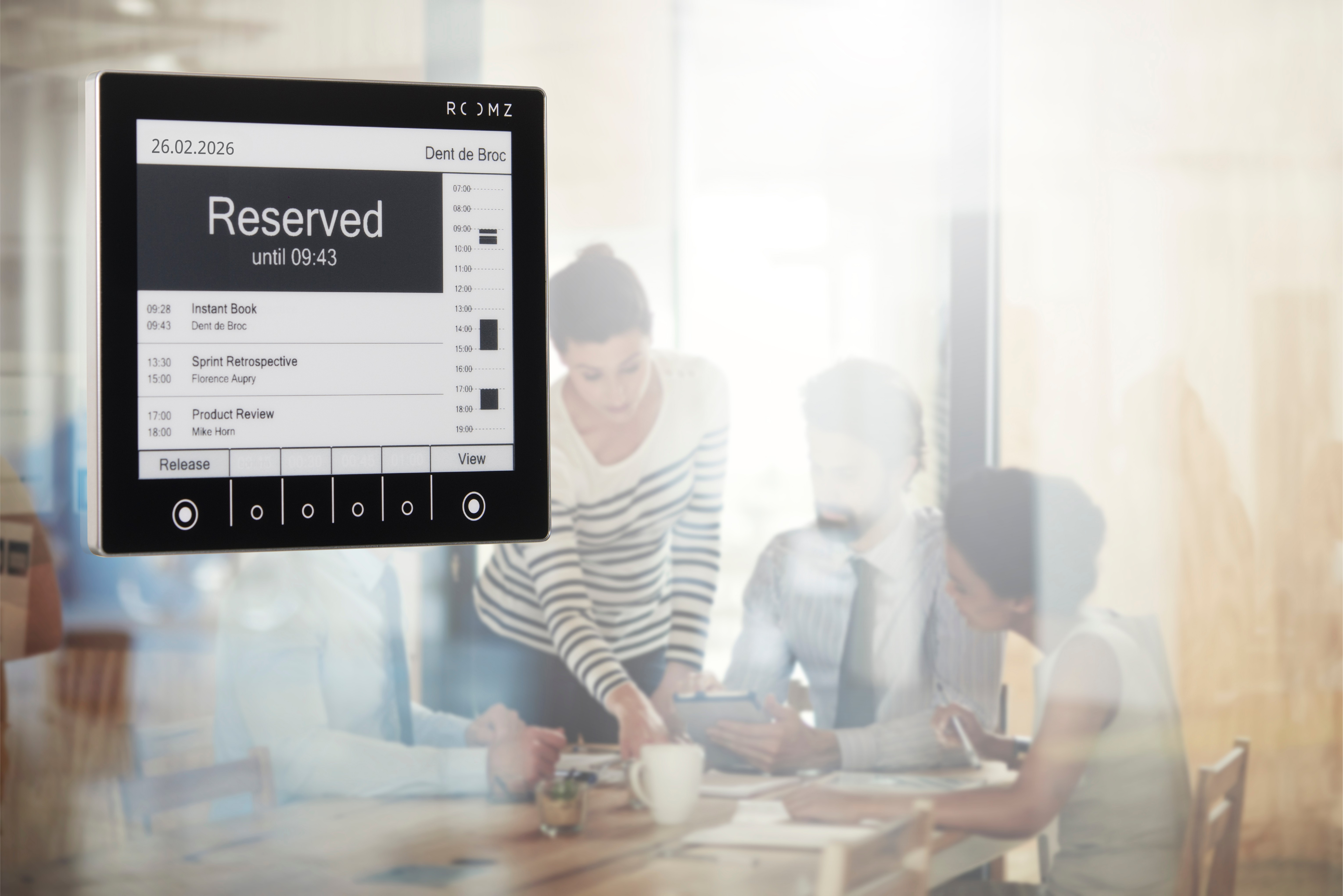
Quick tip: Because there is no cabling and no PoE infrastructure to plan, facility teams can pilot the solution in a single room before scaling it across an entire portfolio of buildings.
|
ROOMZ E-ink© display installed on a glass meeting room wall.
|
A wireless teams panel alternative that also cuts carbon footprint
Sustainability targets are becoming another driver behind the search for an alternative to cabled solutions in the office. Choosing a wireless alternative to a wired room booking display is also a sustainability decision. Based on ROOMZ’s lifecycle assessment of its E-ink© hardware, a wired display generates around 205 kg of CO2 equivalent over 8 years, compared with 64.5 kg for a ROOMZ Display over the same period, roughly three times less, largely because a wired solution needs to be replaced twice as often.
At fleet scale, the difference compounds. Equipping 100 rooms with ROOMZ instead of wired displays over 8 years saves an estimated 14,050 kg of CO2, comparable to 71,327 kilometers driven by a mid-sized car, 5,854 washing machine loads, or the annual CO2 storage of 639 trees. For facility and sustainability teams reporting on environmental targets, this is a concrete, measurable argument in favor of a cabled solutions alternative built on low-power hardware. More detail is available on the
ROOMZ green solution report.
Separately, workplace research also supports the underlying business case for smarter room management. According to the last study of Real Estate specialist CBRE, global office utilization reached 53% in 2025, up from 38% the prior year, and
57% of Corporate Real Estate leaders (CRE) expect their office portfolios to contract over a three-year horizon. Meeting rooms sit at the center of that shift, as companies look to make better use of their existing space while also reducing their carbon footprint. This is why accurate, low-maintenance room booking displays matter more than ever.
Real companies already adopting wireless room booking display
The case for a wireless room booking display is not only theoretical. Several organizations already operating Microsoft 365 or Teams environments have replaced wired scheduling hardware with ROOMZ. For most of them, installation simplicity was the first criterion, but the real proof came later: over several years of daily use, ROOMZ E-ink© displays have also demonstrated their durability and reliability.
The
Scottish Parliament in Edinburgh replaced an end-of-life LED screen and booking system with 35 ROOMZ displays, along with huddle and desk sensors, connected directly to its M365 environment.
„The key benefit of the ROOMZ proposal was the screens and the ability to place them anywhere, even on glass. They are very easy to set up and they look good too.“
— Gary Gibson, Strategy and Performance Manager, Scottish Parliament
Pilatus Aircraft has run ROOMZ since 2017 and now operates 57 displays across its sites, having extended its partnership through 2028, a strong signal of long-term reliability for a wireless deployment at industrial scale.
At
ETH Zurich, more than 600 ROOMZ displays have been installed since 2016, with only 10 RMA cases recorded, an operational reliability record that is difficult to match with hardware requiring active power and firmware management.
More references are available on the ROOMZ case studies page →
How to switch from a wired Teams Booking Panel to ROOMZ?
Moving from a cabled panel to a Teams Panel alternative like ROOMZ is a straightforward project, not a full infrastructure overhaul.
- Request a free ROOMZ starter kit through Try ROOMZ for free, which includes one ROOMZ Display, one ROOMZ Sensor, a wall mount bracket, one hour of support, and a one-month subscription to test in a real meeting room.
- Connect the portal to your existing booking system. ROOMZ integrates with Microsoft Teams and more than 20 other platforms, so there is no need to migrate calendars or change how employees book rooms.
- Mount the display without cabling, on a wall, a door, or directly on glass, a process that 90% of customers complete for their first room in under an hour.
- Scale room by room or floor by floor. Because there is no PoE infrastructure to plan, ABB was able to equip 40 meeting rooms with ROOMZ in less than two days.
- Rely on dedicated support if needed. Technical issues are typically addressed the same day through a 15-minute call with a ROOMZ technician, and 95% of customers rate ROOMZ support as quick and effective.
Teams considering a broader rollout can also
book a meeting with a ROOMZ specialist to plan a multi-site deployment and review integration with an existing Microsoft Teams Rooms environment.
Frequently Asked Questions about Teams panel alternatives
| What is a Microsoft Teams Panel?
A Microsoft Teams Panel is a certified, Android-based scheduling device mounted outside a meeting room to show its availability and allow bookings from the corridor. Certified brands include Cisco, Neat, Poly, Logitech, Yealink, and Crestron, and every device requires a permanent power cable.
|
| Do I need a Microsoft Teams Rooms Pro license for a Teams Panel alternative?
No. Cabled Teams Panels require a Microsoft Teams Rooms Pro license, since Teams Rooms Basic does not support panel devices. ROOMZ, as a wireless alternative, does not require an additional MTR subscription.
|
| Is ROOMZ compatible with Microsoft Teams?
Yes. ROOMZ integrates directly with Microsoft Teams as well as more than 20 other booking systems, including Outlook, Exchange, and Google Workspace, through the ROOMZ configuration portal.
|
| How long does a ROOMZ e-ink display last compared to a wired panel?
A ROOMZ e-ink display has an expected lifespan of up to 10 years and an average battery autonomy of 4 years, compared with an estimated 4-year lifespan for most wired panels before replacement.
|
| Can I install ROOMZ without an electrician or PoE cabling?
Yes. ROOMZ displays require no cabling and can be mounted on almost any surface, including glass, without an electrician. Most customers set up their first meeting room in under one hour.
|
| Is ROOMZ secure enough for large or regulated organizations?
Yes. A ROOMZ Display has no operating system and stores no information locally. The solution is ISO 27001 certified and fully GDPR compliant, which is why it is used by organizations such as the Scottish Parliament, UNESCO, and the Swiss Red Cross.
|
| Why are companies looking for a wired room booking display alternative?
Mainly because of hidden costs and scalability. A wired room booking display alternative removes the cabling budget, the PoE switch, the mandatory Microsoft Teams Rooms Pro subscription, and the roughly four-year replacement cycle that come with a traditional cabled panel, while still displaying live room availability and supporting one-tap booking.
|
|
ROOMZ Experience Box
Experience ROOMZ in your workplace
Install your first ROOMZ Display in less than an hour, with no cabling required. Discover how easy it is to deploy and manage a modern room booking display solution.
Discover ROOMZ Starter Kits →
|
| Author & Technical review |
Nadia Obeida
Author
Creates and curates ROOMZ content focused on room booking, workplace experience, and digital workplace solutions.
Nadia Obeida is Marketing Manager at ROOMZ. For this guide, she translated the needs of IT, Facility Management, and Office Management teams into a practical decision-making resource. She was also responsible for the article’s SEO/GEO strategy and editorial structure.
Nadia Obeida’s LinkedIn profile
|
Roger Meier
Co-author & technical reviewer
Contributes product expertise and real-world experience gained from ROOMZ customer projects.
Roger Meier is the Founder and CEO of ROOMZ SA. He reviewed this guide from a technical perspective, ensuring the accuracy of its content on technology, integrations, scalability, and real-world deployment.
Roger Meier’s LinkedIn profile
|